Generative AI is no longer unfamiliar as a tool for creating images and videos. More recently, it has begun moving beyond generation to modifying existing content, handling repetitive editing tasks, and even building tools needed for production. The change is no longer limited to what AI can create; it is also reshaping the process of content creation itself.
During the second week of November, Adobe and Google announced new technologies that illustrate this shift. Adobe demonstrated how external AI agents could directly edit working files in Photoshop and Premiere, while Google introduced five AI tools in Flow that creators had developed for their own workflows. Although the two companies approach AI differently, both are expanding its role in the content production process.
Generation Alone Is Not Enough
Creating an image or video that looks exactly right on the first attempt is rarely easy. Even when the initial result looks promising, it often requires multiple rounds of revision before it can be used in a finished project. In advertising, for example, a video may need to be revised to reflect client feedback. In narrative content, characters must remain visually consistent across different scenes. Color grading, composition adjustments, and repetitive editing tasks are also part of the process.
However, existing generative AI tools have faced difficulties handling these tasks. Users have sometimes struggled to modify specific parts of an image or maintain the appearance of the same character across multiple scenes. Moving AI-generated content into Photoshop or Premiere for further editing has also added extra steps. Although tools addressing these challenges have already emerged, there is still considerable room for improvement in integrating AI naturally into professional production workflows.
New approaches are beginning to address these limitations. Rather than simply generating content from scratch, AI tools are increasingly being designed to revise existing work, automate repetitive editing tasks, and help creators build functions tailored to their needs. What matters is no longer just what AI can create, but also what it can contribute throughout the production process.
Adobe: Existing Creative Tools Become a Workspace for AI
At its annual Adobe MAX 2026 conference in Miami Beach on November 10 (U.S. local time), Adobe introduced a new approach to AI-powered creative workflows. The central idea is to enable AI to work directly within professional applications such as Photoshop and Premiere, which creators have used for years. To achieve this, Adobe expanded the capabilities of its own AI agents while demonstrating a way to connect external AI agents, including ChatGPT and Claude, to its applications.
Adobe's Creative Agent allows users to describe a task in natural language, after which the AI plans and carries out the necessary steps. The company began introducing AI Assistant capabilities across its major creative applications in June and expanded them further with this announcement. AI features are available in Premiere, Illustrator, InDesign, After Effects, and Frame.io, while Photoshop offers related capabilities through a separate beta application. In Premiere, for example, users can ask AI to organize footage, rename clips, or add markers to specific sections.
AI can also apply the same effects across multiple clips or adjust their color and brightness in batches. These are tasks that editors previously had to handle manually while reviewing large amounts of footage. By delegating some of this repetitive work to AI, editors can spend more time on decisions involving the structure and visual expression of a video.
One of the most notable aspects of the announcement was Adobe's move to open its applications to external AI agents, rather than relying solely on its own AI technology. The company demonstrated this through MCP (Model Context Protocol), an open standard that allows AI systems to connect with other software and services and use their functions. Adobe showed how external AI agents, including ChatGPT, Claude, and Gemini, could invoke functions in locally installed versions of Photoshop, Illustrator, Premiere, and After Effects to edit original project files.
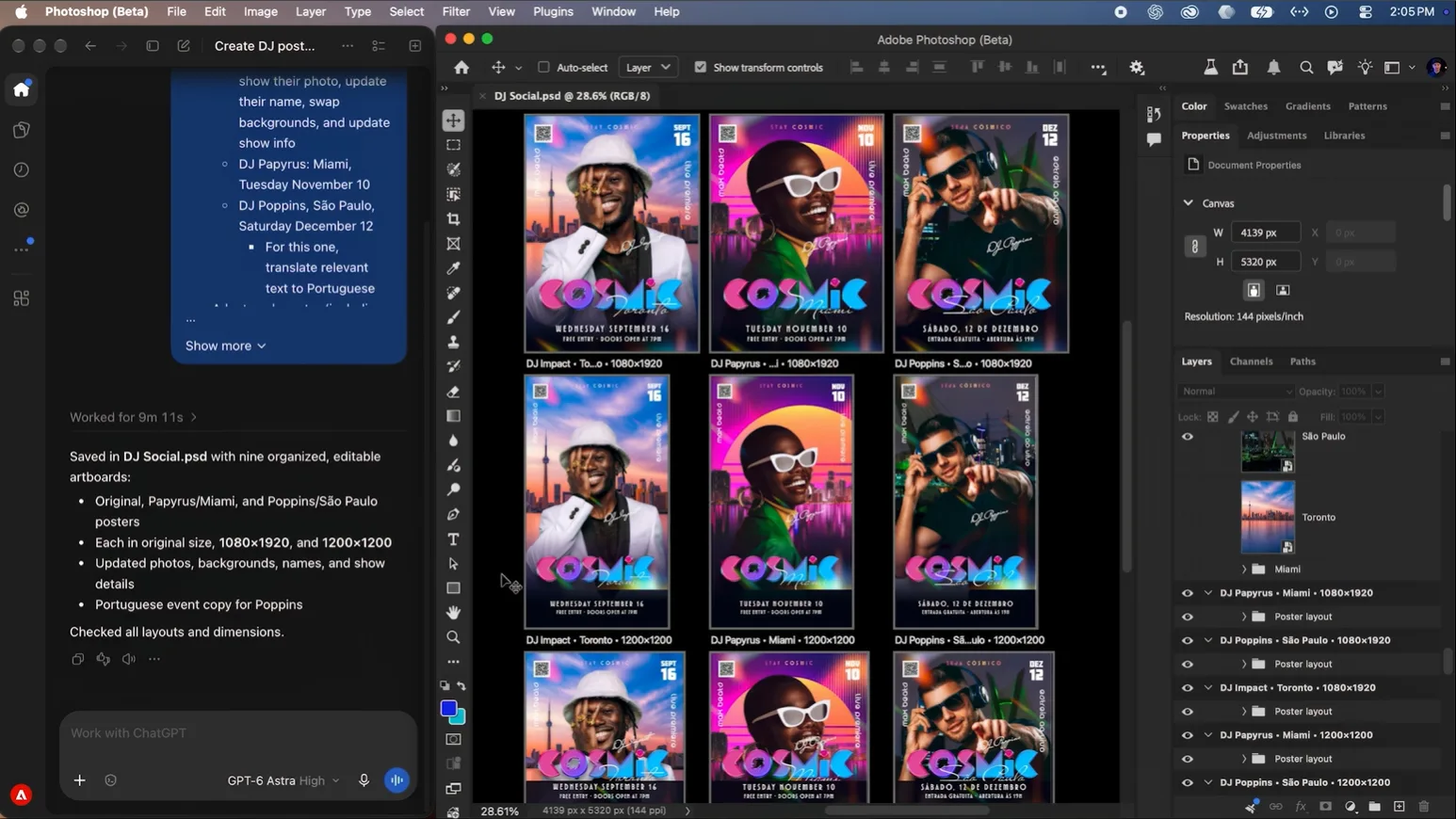
A key feature Adobe emphasized in the demonstration was the ability to preserve the editable structure of original files after AI had worked on them. In Photoshop, for instance, the layers separating different image elements remain intact. In Premiere, the arrangement of video clips and their editing information can be preserved. This allows creators to make further adjustments or continue working on specific parts of a project after the AI has completed its tasks. Unlike an AI system that simply produces a finished image or video, this approach allows people and AI to work on the same editable project.
This is not Adobe's first collaboration with external AI providers. In April, the company introduced a connector that allowed Claude to access more than 50 Adobe creative functions, and in September, it expanded related capabilities to Google Gemini. Previously, these integrations primarily allowed users to invoke selected Adobe functions through an external AI's conversational interface. The latest demonstration takes the approach further by enabling external agents to modify original projects through Adobe applications installed on a user's computer. However, local MCP integration remains at the demonstration stage, with a private beta scheduled for early 2027. Its reliability in real-world production environments has yet to be established.
Adobe's announcement points to a future in which familiar creative applications become environments where people and AI can work together. Rather than manually operating every function, creators may increasingly delegate tasks to AI while retaining the ability to review, adjust, and refine the results themselves.
Google Flow: Creators Build Their Own Tools with AI
On November 12 (U.S. local time), Google introduced five new creative tools within its AI-powered creative studio, Flow. What makes the announcement interesting is that these tools were not designed directly by Google. Instead, filmmakers and visual artists created them to address specific needs in their own creative work.
The technology behind this is Google's Flow Tools. Traditionally, developing new functions for video production often required separate software development or complicated workflows. Flow allows creators to describe what they want in natural language, enabling AI to build a tool that performs the requested task without requiring coding skills. Creators can also share these tools with others or modify them for different projects. Previously published tools can be used without a subscription, while creating new tools requires a paid Google AI subscription. Generating images or videos through these tools may also consume Flow credits.
Among the five newly released tools, Character Arc and Pocket Studio are particularly noteworthy. Both address recurring challenges in video production: maintaining character consistency and refining existing footage.
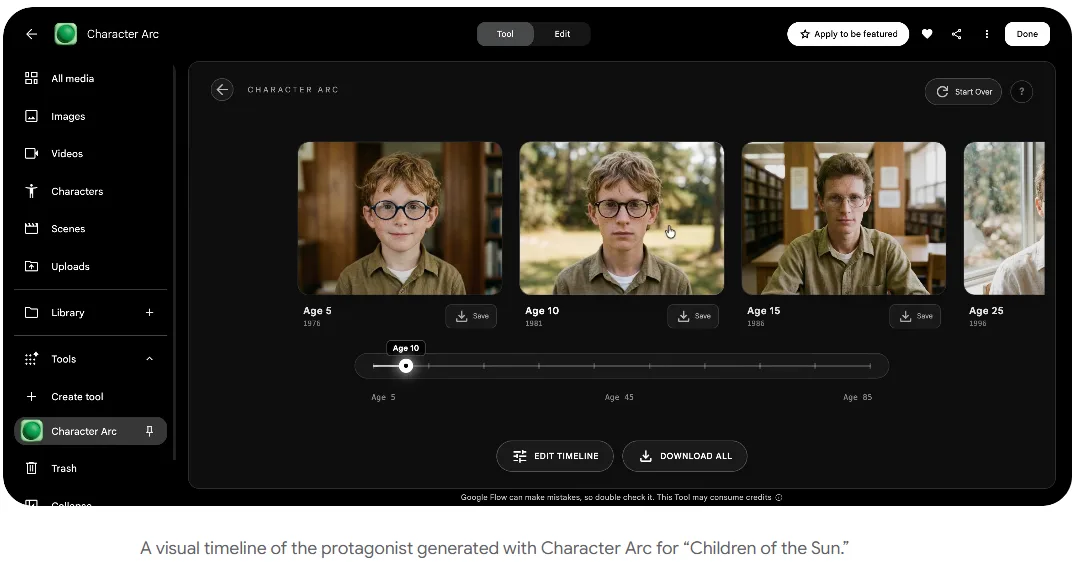
Character Arc, developed by filmmaker Anurag Tiwari, is designed to depict how the same character changes over time. It aims to preserve recognizable features as a person ages from childhood into adulthood. Tiwari has been using the tool in his documentary Children of the Sun, which follows people reflecting on events from 1974, to visualize different stages of a central character's life. The tool represents an attempt to overcome one of generative AI's recurring challenges: maintaining a consistent character identity across multiple scenes.
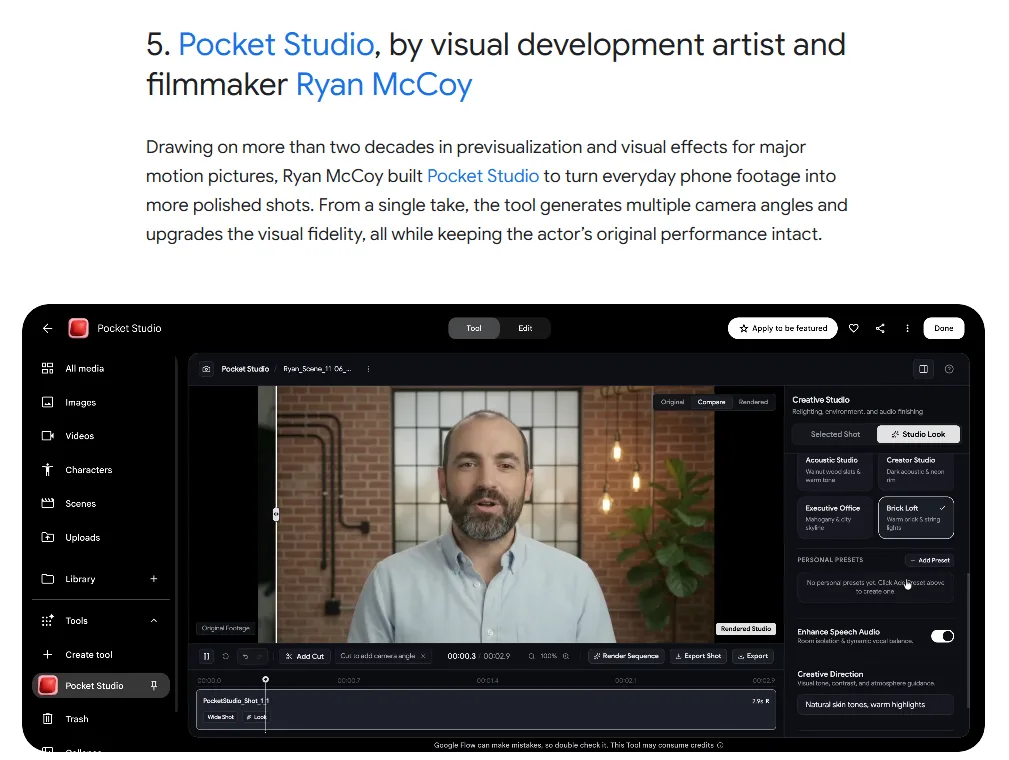
Pocket Studio was created by Ryan McCoy, who has more than 20 years of experience in film previsualization and visual effects. It allows creators to generate multiple camera angles from a single smartphone recording and enhance the visual quality of the footage. The tool is designed to preserve the actor's original performance during this process. By generating alternative camera angles from existing footage, it enables creators to experiment with new compositions without additional filming. Its significance lies in focusing on how existing footage can be reused and developed rather than generating an entirely new video from scratch.
The other three tools serve different creative purposes. Character Poster transforms a simple story concept into a poster with a consistent visual style. Pixel Machine converts images into retro digital styles such as pixel art, ASCII, and glitch effects. Lucid Glass recreates visual effects associated with light refraction and prisms, allowing creators to explore imagery that would be difficult to capture through conventional filming. Each tool reflects a specific function that its creator identified as useful in actual production.
Of course, how reliably these tools perform in real-world production environments remains to be seen. Claims about Character Arc's ability to preserve character identity and Pocket Studio's ability to retain an actor's original performance are currently based on Google's descriptions. Their practical limitations and the quality of their output will require further independent evaluation.
The significance of Google Flow lies in allowing creators to move beyond the functions predefined by software developers. Building AI tools tailored to particular projects and sharing them with other creators is emerging as another way to organize creative work.
Different Approaches, a Shared Direction
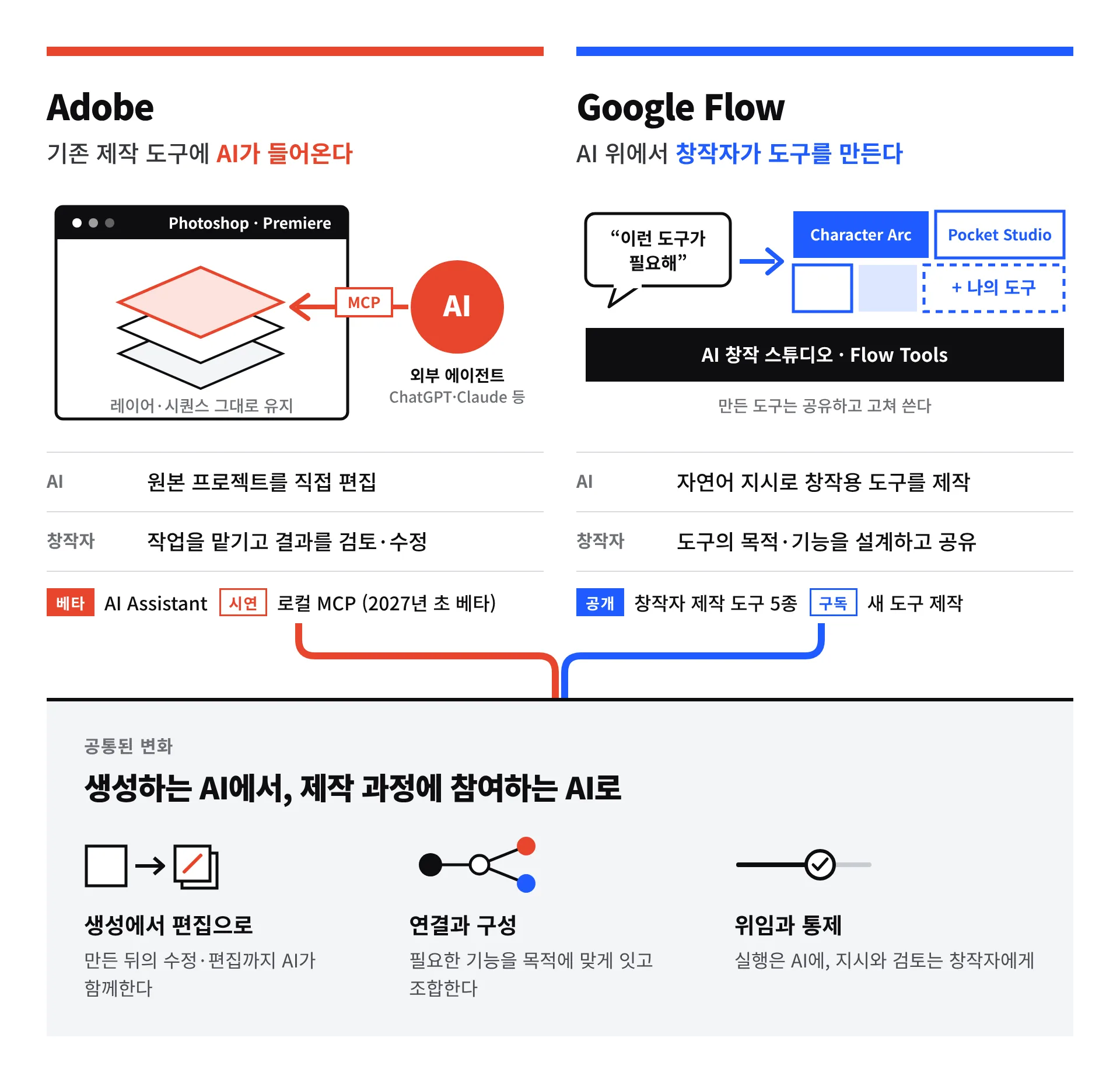
Adobe and Google Flow take different approaches to integrating AI into creative work. Adobe connects AI to existing production software, expanding what those applications can do. Google, meanwhile, enables creators to use AI to build tools tailored to their needs. One changes how familiar tools are used, while the other changes how tools themselves are created.
The distinction between the two companies is not absolute. Adobe also supports user-defined workflows through Firefly Graph. Interestingly, Adobe and Google announced a strategic partnership on November 10 to expand the integration of AI models and creative tools. The agreement includes incorporating Google's AI models into Adobe's creative applications and making Adobe functionality available through Google services. Even as the companies develop different creative environments, they are strengthening the technological connections between them.
The technologies introduced by the two companies are also at different stages of development. Google's five creative tools have already been released, while Adobe's local MCP integration remains a demonstration, with a private beta planned for early 2027. The two technologies therefore cannot yet be regarded as equally mature or widely adopted in professional production.
Nevertheless, both announcements reflect a common shift. AI is expanding beyond the initial generation of images and videos into the editing and refinement of existing content. Adobe demonstrated a way to continue working on projects while preserving their editable structure, while Google introduced tools for transforming generated images and previously recorded footage. AI is becoming relevant across multiple stages of production rather than remaining confined to a single task.
At the same time, creators are gaining new ways to work with their tools. They can connect external AI agents to professional software or develop functions tailored to specific creative goals. Instead of relying exclusively on the features contained within a single application, creators have more opportunities to connect tools and configure their workflows around the needs of a project. Ultimately, the significance of these developments goes beyond the introduction of new AI features. They are changing how creators use tools and carry their work through to completion.
What Matters as Creative Environments Change?
As AI becomes involved in more stages of content production, the way creators work is changing. Previously, creative work largely centered on operating tools directly and making adjustments to the resulting content. Now, creators have more opportunities to delegate parts of the process to AI and manage how those tasks are carried out. Even when adjusting a video's color or editing multiple scenes, they must first decide what should change and what should remain untouched. As AI becomes capable of performing more tasks, communicating creative intent clearly becomes increasingly important.
That does not mean AI-generated or AI-edited work can automatically be treated as a finished product. Creators still need to determine whether a revised video reflects the intended direction, whether important information has been preserved during editing, and whether any images or footage raise copyright concerns. When multiple tools and AI agents contribute to a single project, it also becomes necessary to understand what changes have been made and to retain the ability to reverse or revise them when problems arise.
The changes illustrated by Adobe and Google Flow go beyond simply adding more editing functions. As AI becomes involved in production in different ways, creators gain more choices about which tools to connect and how much work to delegate. This also expands the ways in which creative ideas can be developed and realized.
If generative AI changed how creative work begins, it is now beginning to change how that work is refined and brought to completion.