ChatGPT is changing its role once again.
The first version of ChatGPT was a tool for answering questions. A user asked, and the AI responded. It summarized text, polished emails, explained code, drafted ideas and helped people think through problems.
That alone was disruptive.
But OpenAI’s ChatGPT Work points in a different direction.
ChatGPT no longer wants to stop at answering.
It wants to take a user’s goal, move across apps and files, gather the necessary context and produce finished work: documents, presentations, spreadsheets, reports, dashboards and lightweight websites.
OpenAI describes ChatGPT Work as an agent for longer and more involved tasks. It can research and analyze information, use connected apps and files, create finished deliverables and keep projects moving through scheduled tasks. Users can follow progress, answer questions, change direction and approve important actions while the agent works.
This marks a shift in the AI industry.
The important question is no longer only, “How smartly can AI answer?”
The new question is, “How long, how safely and how reliably can AI keep working until the task is actually done?”
The Unit of Work Is Moving From the Prompt to the Project
The first wave of generative AI use was built around short requests and short outputs.
Write a report draft.
Polish this email.
Explain this Excel formula.
Summarize these meeting notes.
Create a presentation outline.
These tasks are still useful. But real work rarely ends in a single prompt.
To analyze a month-end budget variance, a worker must find source data, move it into a spreadsheet, organize categories, calculate the difference between forecast and actual results, identify the causes, prepare slides and write an executive explanation.
A marketing campaign is similar.
A team must read customer research, compare market differences, write a campaign brief, adjust copy and visuals, localize messages and prepare materials for review.
Sales preparation is also more than a summary.
A representative may need to gather recent customer activity, prior meeting notes, CRM records, email threads, contract status, competitor information and technical requirements. Then the team must produce an account plan, meeting agenda, likely objections and follow-up actions.
ChatGPT Work treats these tasks not as isolated questions, but as projects.
The user states the goal. ChatGPT identifies the steps, connects the relevant sources, asks clarifying questions when necessary, seeks approval for important actions and moves toward a completed result.
The unit of AI use is shifting from the prompt to the workflow.
Codex Is Expanding From Developer Tool to Work Operating System
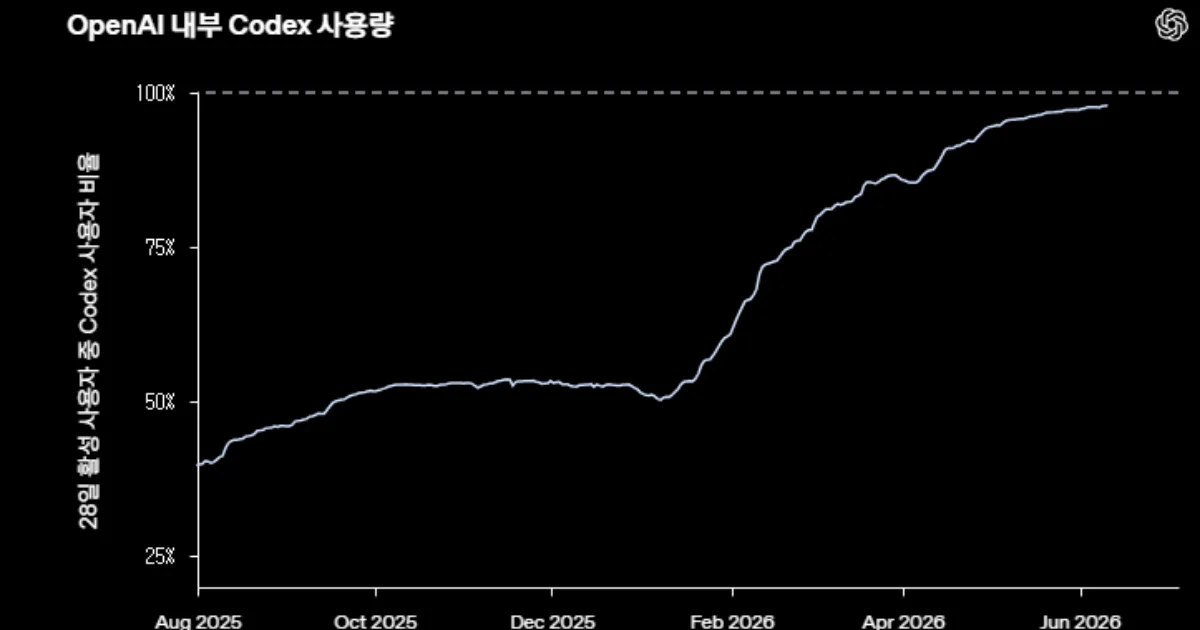
Behind ChatGPT Work is the broader evolution of Codex.
Codex began as a coding agent for developers. It could read code, modify files, run tests and review pull requests. But OpenAI has increasingly framed Codex as something larger than a software-development assistant.
In earlier product updates, OpenAI said Codex could use apps on a computer, operate across everyday tools, work with plugins, schedule future work and continue long-running tasks over time. It also said developers were using Codex not only to write code, but to understand systems, gather context, review work, debug issues and coordinate with teammates.
That matters because much of enterprise work resembles software work more than it first appears.
A coding agent reads a repository, finds an error, writes a fix and runs tests.
A business agent reads documents, finds data, builds a table, creates slides and checks whether the output matches the goal.
Both require the same core capabilities.
Understand context.
Use tools.
Maintain state.
Validate intermediate results.
Produce a usable artifact.
ChatGPT Work brings that agentic logic into general knowledge work.
GPT-5.6 Becomes the Engine for Long-Horizon Work
ChatGPT Work is powered by GPT-5.6.
OpenAI’s release notes say the GPT-5.6 family is available across ChatGPT, Codex and the OpenAI API. The family includes GPT-5.6 Sol for frontier capability, GPT-5.6 Terra for a balance of intelligence and cost, and GPT-5.6 Luna for efficient high-volume workloads. GPT-5.6 also adds programmatic tool calling, persisted reasoning, explicit prompt caching controls, maximum reasoning effort and beta multi-agent orchestration in the Responses API.
This shows how the standard for model performance is changing.
It is no longer enough for a model to solve exam questions or generate fluent answers.
In the workplace, a model must maintain instructions across long tasks, follow templates, combine multiple sources, preserve formatting and produce something that can be used in a real meeting or decision process.
The benchmark is no longer only the answer.
It is the deliverable.
A report that follows the company’s format.
A spreadsheet whose formulas work.
A presentation that can be shown to executives.
A dashboard that reflects current data.
A project site that a team can use.
ChatGPT Work aims at this space of finished work products.
AI is moving from drafting to delivering.
Once AI Connects to Apps and Files, Its Role Changes
The most important change in ChatGPT Work is connectivity.
OpenAI says ChatGPT can use context from connected tools and files, with more than 1,400 plugins available to pull information from tools and workflows people already use.
That is a major shift.
AI needs context to work.
Until now, one of the biggest burdens of using ChatGPT in professional settings was that the user had to bring the context manually. They copied documents, uploaded spreadsheets, summarized email threads and explained what mattered.
Even a powerful model cannot do much without the right materials.
ChatGPT Work reduces that burden.
It can read from the places where work already happens, identify relationships between materials and create the required output.
It can update an account-plan presentation using a customer data room and Slack context. It can reconcile data from business systems. It can schedule recurring business reviews, meeting preparation and campaign tasks using email and Slack context.
At that point, AI is no longer just an adviser in a separate chat window.
It becomes an operator inside the workflow.
Sites Blurs the Line Between Report and App
One of the most notable features is ChatGPT Sites.
OpenAI says Sites allows users to turn work or ideas into interactive websites or lightweight apps without leaving ChatGPT. Users can create dashboards, project trackers, launch calendars, prototypes, internal portals and reports, then preview and refine the result before sharing it.
This is more than document generation.
For decades, office work has been organized around three main artifacts: documents, spreadsheets and slides.
Documents explain.
Spreadsheets calculate.
Slides persuade.
But modern work increasingly requires something more dynamic.
Live dashboards.
Project trackers.
Launch calendars.
Internal portals.
Interactive reports.
Product prototypes.
Sites moves ChatGPT toward the creation of small business applications.
A user does not need to know web development to build a lightweight interface for a specific purpose. The user describes the goal, provides files or constraints and reviews the result.
This could pressure the no-code and low-code market.
In earlier no-code tools, users built apps by combining blocks, buttons and templates. With ChatGPT Sites, the direction is different: describe the outcome, and the AI generates the interface, structure and presentation.
AI is no longer only helping people write about work.
It is beginning to build the software surface on which work happens.
Scheduled Tasks Turn AI Into an Always-On Operator
Another key feature is scheduled work.
OpenAI says ChatGPT Work can run scheduled tasks once, repeat on a schedule or trigger, and monitor for changes.
This changes the role of AI.
Until now, ChatGPT has mostly responded when the user called it.
Scheduled tasks allow AI to act before the user returns.
It can review weekly Slack updates and prepare meeting agendas. It can check dashboards each morning and summarize changes. It can update a presentation when new customer feedback arrives. It can monitor account activity and refresh a sales plan.
This is significant for enterprise work.
Many organizational tasks are not primarily creative. They are repetitive monitoring and coordination tasks.
Check whether new emails arrived.
See whether a metric changed.
Find whether a customer request was missed.
Keep the meeting deck current.
Update the project tracker.
ChatGPT Work can begin to function like a support operator that continuously watches for change and updates the work product.
AI is becoming less like a conversation partner and more like operational staff.
Desktop AI Weakens the Boundaries Between Apps
OpenAI also updated the ChatGPT desktop experience.
The new desktop app brings Chat, Work and Codex together. On desktop, Work can use local files and desktop apps with user permission, while the built-in browser lets ChatGPT gather information from websites and supported web-based tools and files.
This matters because real office work rarely happens in a single web app.
Workers move across local files, desktop applications, internal systems, browsers, messaging tools and email. They open, copy, paste, download, upload, compare and reformat all day.
If ChatGPT can operate across that layer, the productivity equation changes.
AI no longer needs to be embedded only inside one application. It can sit across the operating system, browser, files and business tools.
That weakens traditional software boundaries.
The user may no longer need to think separately about what to do in Excel, what to find in Slack or where to click in a browser.
The user states the goal.
The AI moves across the tools.
The Strategy Is to Enter the Places People Already Work
OpenAI’s approach reflects a practical product strategy.
Rather than asking users to abandon existing tools, ChatGPT Work is designed to operate across the tools, files and workflows they already use.
This matters for enterprise adoption.
Workers do not easily change their entire software environment. Companies are even slower because of security, compliance, training and compatibility requirements.
A new AI browser or a separate AI workspace may be interesting, but it creates adoption friction.
An agent that works inside existing browsers, desktop environments and connected business tools has a lower barrier to entry.
That is the strategic lesson.
AI does not need to replace every app immediately.
It needs to sit across them.
Security and Governance Become the Central Enterprise Problem
The more capable ChatGPT Work becomes, the more serious enterprise concerns become.
If AI can access email, calendars, CRM records, document repositories, Slack, Teams, local files, browsers and internal tools, permissions become a central issue.
What if the AI shares the wrong document?
What if it copies sensitive data into the wrong place?
What if it accesses a system it should not?
What if it performs an action that requires human approval?
OpenAI’s release notes emphasize enterprise controls. Enterprise and Edu workspaces have administrative controls during rollout, and public publishing for Sites is off by default in Enterprise workspaces unless enabled by an admin.
That points to the larger requirement for agentic AI in business.
Access.
Audit.
Approval.
Records.
Data boundaries.
Tool permissions.
Sensitive-action controls.
AI agents force companies to ask not only what the AI can do, but what it must never be allowed to do.
In the agent era, governance becomes part of the product.
Every Team May Get an AI Operator
The use cases for ChatGPT Work span sales, marketing, finance, business operations, data analysis and engineering.
A sales team can monitor customer activity and update account plans.
A marketing team can turn customer research into campaign briefs and assets.
A finance team can gather source data, reconcile numbers in Excel or Sheets and create slides.
An operations team can track project status.
A data team can build dashboards and analytical reports.
The deeper change is not that every team gets an AI assistant.
It is that every team may get an AI operator.
An assistant helps when asked.
An operator understands a workflow, finds missing pieces, handles repeated tasks and keeps outputs up to date.
If ChatGPT Work enters the enterprise at scale, team routines could change.
Meeting materials may be prepared automatically.
Account plans may stay continuously updated.
Month-end reports may be drafted in hours.
Project sites may refresh as new information arrives.
People may spend less time gathering materials and more time on judgment, persuasion and decision-making.
But this transition will not happen automatically.
Companies must decide which tasks AI can perform, which actions require approval, which data should remain inaccessible and who is responsible for reviewing AI-generated work.
The more AI does, the more important human accountability becomes.
Korean Companies Need Work Redesign, Not Just AI Adoption
ChatGPT Work has direct implications for Korean companies.
Until now, many corporate AI deployments have focused on chatbots, document summaries, internal search and customer-service automation. Employees may use AI individually, but organizational workflows often remain unchanged.
ChatGPT Work points to a different question.
The issue is no longer, “Should employees be allowed to use ChatGPT?”
The issue is, “Which business processes should be redesigned around AI agents?”
In sales, companies could connect CRM data, emails, meeting notes, proposals and customer issues to automatically update account plans.
In finance, they could connect source systems, spreadsheets, budget files and report templates to automate month-end materials.
In public affairs and communications, they could connect news, disclosures, parliamentary schedules, regulatory documents and internal messages to produce daily briefings.
The goal is not to add another AI tool.
It is to redesign the flow of input, processing, review, approval and distribution.
When AI enters a workflow, the existing process does not simply become faster.
Some steps disappear.
Some roles change.
Some controls become newly necessary.
Agentic AI Changes How Organizations Work
ChatGPT Work points to a clear future.
AI is no longer a chat box on the side of the screen.
It opens files, reads data, moves through browsers, creates documents, updates meeting materials and shares work with teams.
That will affect organizational structure.
Junior employees may spend less time collecting and formatting information. Managers may spend more time reviewing AI-generated drafts and making decisions. Expert value may shift from producing raw materials to asking better questions, setting better constraints and judging which outputs deserve approval.
But the risks are also clear.
AI may use outdated documents.
It may pull the wrong data.
It may share sensitive information.
It may misunderstand permissions.
It may repeat a small error at scale.
An organization in the agentic AI era needs two capabilities at once.
The ability to delegate work to AI.
And the ability to verify what AI has done.
One without the other is not enough.
The Era of AI That Only Answers Is Ending
ChatGPT Work shows where OpenAI wants to go.
ChatGPT does not want to remain a tool that answers questions. It wants to become a partner that turns goals into finished work.
That means the competitive frame for AI products is moving away from benchmarks alone and toward work completion.
The old questions still matter.
How natural is the answer?
How well does the model summarize a document?
How accurately does it explain code?
But they are no longer sufficient.
The new questions are different.
Can the AI safely connect to company files and apps?
Can it work for hours without losing the goal?
Can its output be used directly in a real meeting?
Can it automate repeated work while asking for approval on sensitive actions?
Can the company audit and control what the AI did?
ChatGPT Work signals that AI is moving from the edge of knowledge work to its center.
AI is no longer only something that gives an answer.
It is becoming something that takes a task.
And from that point forward, corporate competitiveness will depend not simply on how well a company uses AI, but on how quickly it redesigns work around AI.