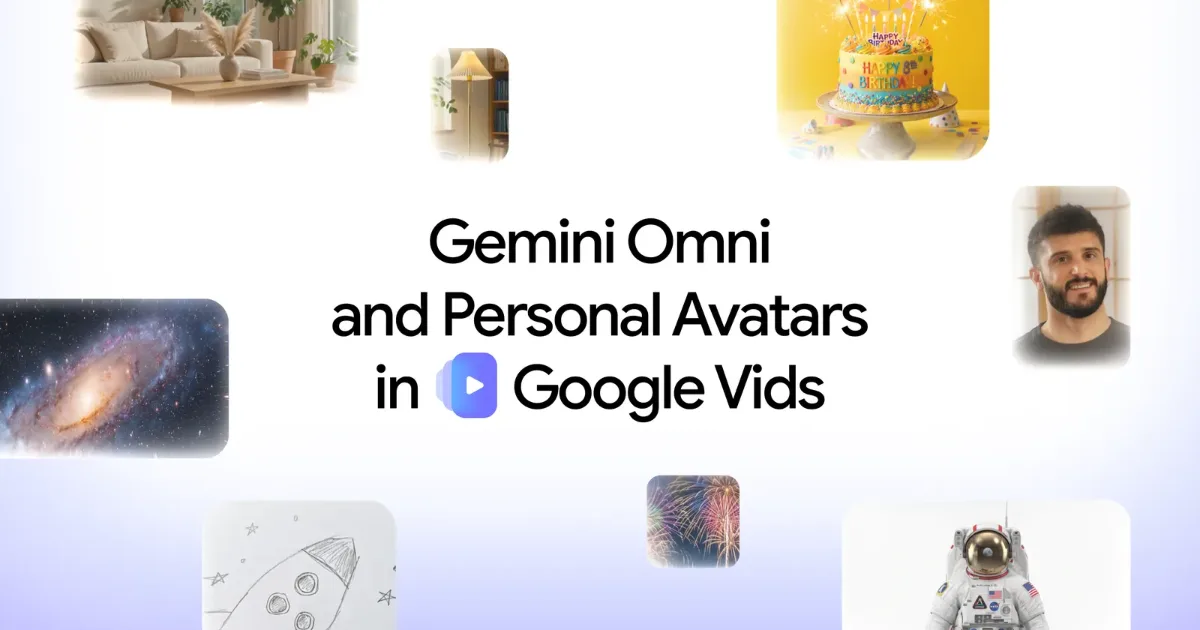
Google has added two major AI features to Google Vids.
The first is Gemini Omni.
Users can describe the video scene they want in natural language, add reference images such as photos or sketches, and generate video clips inside Google Vids. They can also edit AI-generated clips or videos shot on a phone by giving conversational instructions. Backgrounds can be changed, lighting can be adjusted and effects can be added through everyday language rather than traditional editing controls.
The second feature is personal avatars.
A user uploads a selfie and a short voice recording. Google Vids then creates a digital avatar that looks and sounds like that user. After that, the user can type what they want to say, and the avatar delivers the message on video. The user does not need to turn on a camera or record the message directly.
On the surface, these look like convenience features for video creation.
But their business meaning is much larger.
Google is trying to turn video production from a filming-and-editing workflow into a text-based workplace workflow, closer to writing a document or preparing a slide deck. More importantly, it is pulling video into Google Workspace, where reports, presentations, email, meetings, files and now video can be created, edited and shared as part of one productivity environment.
Video is no longer a special media asset.
It is becoming a workplace deliverable that can be drafted like a document, revised like a slide and sent like an email.
Google Vids Is Not Competing Only With Video Editors
To view Google Vids simply as a video-editing tool is to define the market too narrowly.
Of course, Google Vids competes with tools such as Canva, Adobe Express, Descript, Runway, CapCut and Synthesia. All of them are trying to make video creation easier, faster and more accessible.
But Google’s real advantage is not only editing.
It is Workspace.
Enterprise work already happens inside Google’s ecosystem.
Documents are written in Docs.
Presentations are built in Slides.
Data is organized in Sheets.
Meetings happen in Meet.
Schedules live in Calendar.
Files are stored in Drive.
If Vids becomes part of this environment, video no longer needs to be a separate creative project. It can become one more productivity artifact inside the daily work system.
That is important because video production has long been difficult inside companies.
Internal training videos, product explainers, leadership messages, sales follow-ups, customer tutorials, onboarding materials and internal campaign videos all require planning, recording, editing, captioning, review and distribution. Many organizations know video is effective, but they still rely on text documents and slide decks because video is slower and more expensive to produce.
Gemini Omni and personal avatars change that cost structure.
Video creation moves from specialists to ordinary employees.
A marketing manager, HR lead, sales representative or team manager can describe what they need and produce a draft. If the result is not right, they can revise it through conversation. If they do not want to appear on camera, an avatar can speak for them.
Google is not targeting only the video-editing market.
It is targeting the much larger market in which every team uses video as a normal workplace output.
The Biggest Bottleneck in Video Production Was Not Shooting. It Was Revision.
The largest barrier in video production is often not the first draft.
It is revision.
There are already many tools that can generate images and videos. But work-ready video rarely comes from the first output. The background may look wrong. The lighting may be inconsistent. The transition may feel awkward. The style may not match the brand. A clip shot on a phone may need only one section fixed, but the user may not know how to use a professional editing timeline.
Gemini Omni addresses this exact point.
Google says users can generate clips through natural language and then refine videos through conversational editing. The system can work not only with AI-generated clips, but also with videos captured on a phone.
This changes the interface of video editing.
Traditional video editing speaks the language of timelines, cuts, layers, effects panels, color correction and audio tracks.
The new interface speaks natural language.
“Make the background look like an office.”
“Brighten the lighting.”
“Make it feel more professional.”
“Shorten the opening and add the logo at the end.”
That shift is decisive for non-specialists.
A marketer, salesperson, HR manager, trainer, startup founder or team leader can produce and revise videos without learning a full editing suite. Professional production teams can focus on high-end work, while short, repetitive and practical workplace videos can be handled directly by business teams.
Video editing is moving from software manipulation to conversational instruction.
Personal Avatars Lower the Cost of Workplace Communication
The personal avatar feature points to an even bigger shift.
Until now, making a video message required a person to appear on camera. They had to dress appropriately, choose a background, set up lighting, record multiple takes and start over when they made a mistake.
Many people avoid video because of that burden.
Personal avatars reduce the friction.
A user creates an avatar from a selfie and short voice sample, then types the message. The avatar delivers it. There is no need to record again for every version. The same message can potentially be adapted for different teams, customers, regions or languages.
For companies, the use cases are obvious.
CEO messages.
Department announcements.
HR onboarding.
Training content.
Sales follow-ups.
Customer guidance.
Internal campaigns.
Product update videos.
The feature is especially powerful for repetitive communications. A message can be personalized for different teams or customer segments without bringing the speaker back into a studio every time.
The cost of video communication falls.
That is the business significance of personal avatars.
But a Video That Looks Like “Me Speaking” Is Sensitive
Personal avatars are convenient.
They are also highly sensitive.
This is not merely a cartoon character or a generic AI presenter. The feature creates a video that looks like the user and sounds like the user. It is both a productivity tool and a technology for reproducing identity.
Google says personal avatars in Vids are tied to the user’s Google Account and are designed so users can create and manage their own avatar. The rollout is limited to eligible Google AI Pro, Ultra and Workspace business customers, with availability managed through Google’s product and admin systems.
That shows Google understands the risk.
But the questions remain.
Is a message spoken by an avatar the same as a message spoken by the person?
Who wrote the script?
Will an organization treat the avatar’s speech as an official statement?
Can an employee delete or disable their avatar?
Can a manager pressure an employee to create avatar videos?
What happens to avatar data after an employee leaves?
Who is responsible if the avatar says something sensitive or inaccurate?
In workplace communication, face and voice are not neutral media.
They are signals of trust.
People tend to feel that a person in a video is speaking directly to them. If the video is not a real recording but a text-driven avatar, the meaning changes. The message may be faster to produce, but it may feel less authentic.
This is especially important for leadership communication.
If an executive uses an avatar to deliver an important message during a crisis, restructuring or organizational change, the message may be efficient. But it may also feel distant. Employees may feel that leadership chose a synthetic version of presence instead of appearing directly.
Technically, this is productivity.
Humanly, it can create distance.
Video Authenticity Is No Longer Assumed
Google says every generated clip includes an invisible SynthID digital watermark to help verify that it is AI-generated.
That matters.
In the age of AI video, people can no longer judge authenticity simply by looking. A clip may be filmed, generated, edited, synthetic or avatar-delivered. In the workplace, this matters because video is used for announcements, training, reporting, customer communication and executive messaging.
But watermarking is not enough by itself.
Not every viewer checks for a watermark.
Videos may leave the original platform and be reprocessed elsewhere.
The more important question may not be whether the video is AI-generated, but who approved it.
Avatar videos also require a different kind of disclosure. Viewers should understand not only that AI was used, but that the person in the video did not necessarily speak the message live or record it directly.
That means companies need policies, not just technical markers.
Which videos require AI-generated labels?
What consent is needed for personal avatar use?
What disclosure is required for customer-facing videos?
Who approves executive avatar videos?
Should internal training videos and external marketing videos have different rules?
Trust in AI video cannot be secured by technology alone.
It requires organizational transparency.
The Meaning of Video AI Inside Workspace
The fact that these features are in Google Vids matters.
An AI video tool as a standalone app has one meaning. An AI video tool inside Workspace has another.
Inside Workspace, video becomes a peer to documents, slides and spreadsheets. It becomes part of the normal work stack.
That can change how organizations produce content.
In the past, text was the default. Important information became an email or a document. If persuasion was needed, it became a slide deck. Video was reserved for special cases.
If AI lowers the cost of video production, that balance may change.
New-hire guidance can become video instead of a long document.
A sales follow-up can become a short avatar message.
A product update can be shared as a clip rather than a slide.
A team leader can explain a policy change through a generated video.
A complex process can become a short how-to video instead of a written manual.
This is a shift in workplace communication formats.
Organizations may move partly from document-first to video-first communication.
Not everything should become video. Documents remain better for search, recordkeeping and detailed review. Video is better for delivery, explanation and emotional engagement.
The important point is that the choice expands.
Work that previously stayed in text because video was too expensive may now become video.
The AI Video Market May Grow More Among Office Workers Than Creators
AI video generation is often discussed as a creator tool.
YouTubers, advertisers, filmmakers and short-form creators can use AI to produce content faster. That market is important.
But Google Vids points in a different direction.
Google is bringing AI video into the workplace. It is not primarily about cinematic production. It is about making short, practical videos for everyday business needs.
That market is enormous.
Every company trains employees.
Every company makes announcements.
Every company explains products.
Every company communicates with customers.
Every company transfers internal knowledge.
Until now, much of that work was handled with text and slides because video was too difficult and expensive.
If AI lowers the barrier, enterprise video demand could expand rapidly.
The central market for Google Vids may not be professional video creators.
It may be people who were never video creators at all.
That is why productivity software companies are entering AI video.
Google’s Weapon Is Different From Adobe, Canva, Synthesia and Runway
The competitive environment around Google Vids is crowded.
Adobe is strong in professional creative workflows.
Canva is strong in fast design for non-designers.
Synthesia is strong in enterprise avatar video for training and communication.
Runway is strong in generative video and creative experimentation.
OpenAI and other AI companies are advancing video-generation models.
Google’s weapon is different.
It has Workspace and account identity.
Enterprise users already sign in with Google accounts. They already use Drive, Docs, Slides, Gmail, Meet and Calendar. If a personal avatar is tied to a Google account and video generation happens inside Vids, Google can connect workplace identity, content creation, permissions and collaboration.
That is powerful in the enterprise.
Companies care about who created a video, which account generated it, who had permission to share it and how it fits into the organization’s governance structure.
A video tool inside Workspace may feel easier to adopt than a standalone AI-video product, especially for companies already committed to Google’s productivity stack.
Google is not competing only on video quality.
It is bundling video generation with workplace identity, collaboration, sharing controls and enterprise administration.
What Korean Companies Should Watch
Korean companies will not be able to ignore this shift.
Demand for internal video communication is already rising. Training, safety education, information-security education, sales enablement, customer guidance, leadership messages, recruitment branding, product explanations and incident notices can all benefit from video.
But video production remains slow in many organizations.
Planning, filming, editing, captioning, approval and distribution take time. If AI video tools reduce that cost, business departments may start producing videos directly.
That can be useful.
But Korean companies should be especially cautious with personal avatars.
A workplace avatar based on an employee’s face and voice raises sensitive questions. Can a company ask an employee to create one? Can the employee refuse? Where is the avatar data stored? What happens after resignation? Could a manager effectively pressure an employee to use their likeness for corporate communication?
Executive avatars are even more sensitive.
If an executive avatar sends a message to investors, customers or employees, the video may be interpreted as an official statement. The approval process and permitted use cases must be explicit.
Avatar video is convenient.
Used carelessly, it can damage trust.
The real issue in adopting AI video is not only speed.
It is who may use whose face and voice, for what purpose and under what authority.
Democratization Can Also Create Content Overload
Google Vids can democratize video production.
Anyone can make videos. Anyone can revise them. Anyone can use an avatar to appear in them. That can increase productivity. Small teams can create polished materials quickly. Training and guidance content can be produced more easily.
But democratization can also create excess.
If every department starts making videos, employees may have to watch more and more clips. A message that could be read in one minute may become a five-minute video. If avatar videos become common, communication fatigue may increase rather than decrease.
Companies will need content principles.
Is video really the right format for this message?
Would text be better?
How long should the video be?
Is AI or avatar use clearly disclosed?
Should an important message be delivered by a real person rather than an avatar?
Are employees being overloaded with video content?
Just because AI makes video easy does not mean everything should become video.
As production costs fall, editorial judgment becomes more important.
Video Is Becoming Workplace Data
The Gemini Omni and personal avatar updates in Google Vids show an important direction for AI video.
Video creation is moving from filming and editing to prompts and account identity. Users can generate videos in natural language, revise them through conversation and appear in videos without turning on a camera.
That can reshape workplace communication.
Video production costs fall.
Training and announcements become faster.
Customer-specific videos become easier.
Business teams can create their own content.
Documents, slides and videos become part of the same Workspace flow.
But the risks grow as well.
Personal avatars turn faces and voices into workplace assets. AI-generated videos become harder to distinguish from recorded videos. Easier video creation can produce content overload. Transparency, consent, approval, disclosure and deletion rights become more important.
Google emphasizes SynthID watermarking for generated clips. That is necessary. But in the workplace, something else matters even more.
Organizational commitment.
A commitment not to misuse employee faces and voices.
A commitment not to present avatar videos as if they were direct live statements.
A commitment that important messages remain accountable to real people.
A commitment to use AI video without damaging trust.
Google Vids makes video creation easier.
But the real lesson for companies is not simply how to make videos with AI.
It is how to make AI-generated video trustworthy.