For a long time, performance was one of the most important considerations when choosing a personal computer. Every new generation of software and games demanded faster CPUs and GPUs and more memory, and replacing a computer after a few years as its performance fell behind was simply part of the cycle. Whatever you wanted to do on a PC required enough computing power inside the machine itself.
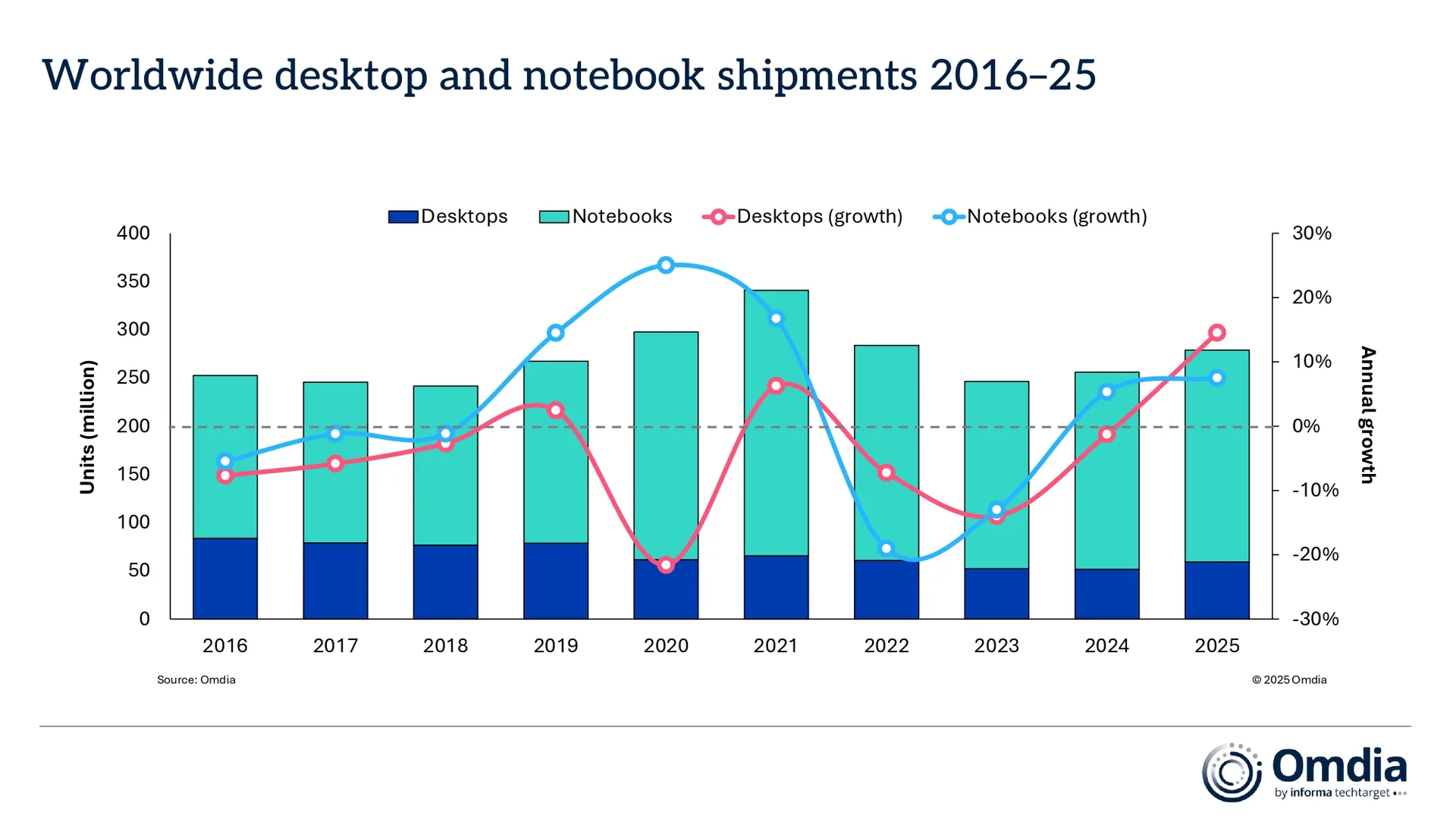
But as where and how people used computers changed, so did the PC. Laptops that could be opened and used almost anywhere moved to the center of personal computing, while much of everyday internet use shifted to smartphones and tablets. Omdia’s worldwide PC shipment data shows that between 2016 and 2025, desktop shipments declined while notebook shipments increased overall. By 2025, notebook shipments were more than three times those of desktops.
The spread of the internet and cloud computing pushed this shift even further. Documents are now written on the web, files are stored in the cloud, and music and video are increasingly streamed rather than stored locally. More tasks can be done entirely in a browser without installing software, while demanding computation can be handled by borrowing data-center resources when needed. PC performance has not stopped mattering, but there is less reason for every computation to happen on the computer sitting in front of us.
Generative AI initially seemed to extend this trend. When people use ChatGPT or Claude, the actual models generally run not on their PCs but in massive data centers. Users send a request and receive a response, while the enormous amount of computation in between happens in the cloud. This is also why huge AI models can be used from smartphones and lightweight laptops.
Recently, however, movement in the opposite direction has also been gaining momentum. “Local AI,” in which models are downloaded and run directly on a PC, is becoming much easier to use. A desktop bought a few years ago for gaming or video editing, an older workstation, or an Apple Silicon Mac with enough GPU performance and memory can now find a new purpose because of AI.
A PC that may have fallen out of use as someone’s primary computer can now return as a machine that computes for AI.
AI Comes Down from the Cloud to the PC
Running AI models on a PC is not new in itself. Developers and researchers have long trained and run machine-learning models on their own computers. But doing so required setting up the environment and managing models directly, keeping it far removed from ordinary PC use.
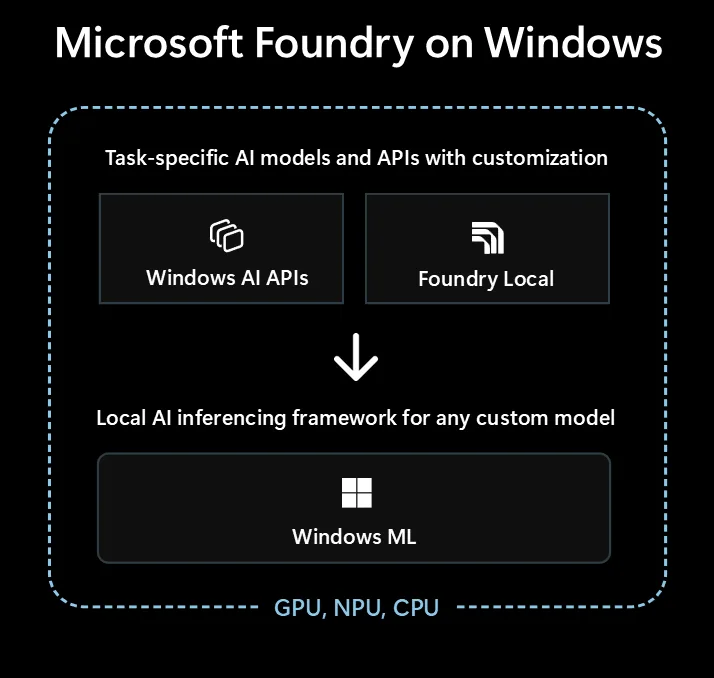
What has changed is how quickly that barrier is coming down. Applications such as Ollama and LM Studio allow users to download and run a variety of AI models directly on their own PCs. Underneath them are technologies such as the open-source llama.cpp project, designed to run language models across different types of CPUs and GPUs. There are now more ways to use AI locally without having to build a complex development environment from scratch. And this shift is no longer confined to standalone AI applications. Microsoft is also expanding the environment for running AI models directly on Windows PCs through Foundry Local and Windows ML. Local AI is beginning to move beyond experiments by developers and into a broader way of using personal computers.
Take this one step further, and the PC itself can function like an AI server. A locally running model can expose an API that allows other applications or devices to access it. Requests that would normally travel across the internet to a distant data center can instead be handled by a PC in the same room or elsewhere in the house.
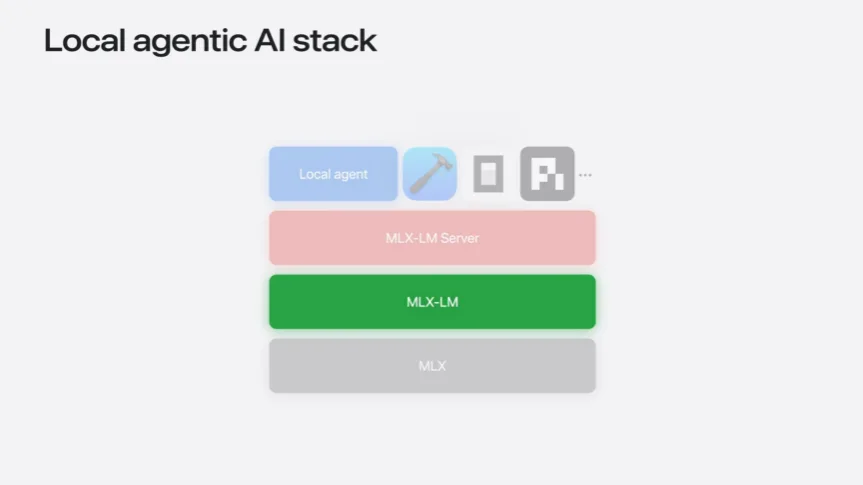
Apple recently demonstrated a somewhat extreme version of how far this idea can go. MLX-LM Server, introduced at WWDC26, allows a Mac to run a language model while letting other applications access it through an API. A single Mac can therefore both run the model and act as a server that provides AI capabilities to other applications. And when one machine is not enough, multiple Macs can be connected. Apple also demonstrated how MLX distributed inference can split a single model across several Macs. The demonstration featured Kimi 2.6, a model with a total of one trillion parameters. Even at 8-bit quantization, its weights require roughly 1 TB of memory—too much to fit on a single M3 Ultra, but possible when distributed across four Macs. Apple also showed the model running across multiple Macs while being accessed remotely from another MacBook.
But the important point here is not the performance of the Mac itself. It is that the way personal computers are used is changing. In the past, a person sat in front of a PC and ran applications on it. Now a computer can be left running an AI model while another computer or application taps into its computing power. The PC is beginning to serve not only as a machine used directly by a person, but also as a small AI server that provides computing power to other devices.
An Old PC Finds a New Job
This shift is particularly interesting for desktops. A PC bought several years ago for gaming or video editing may no longer be the primary machine, but it can still have considerable GPU performance. It may struggle to run the latest games at maximum settings or compete with a new workstation, yet still have enough capability to continuously run an AI model suited to its hardware.
The way such a machine is used is also different. No one needs to sit in front of a computer being used as an AI server. The model can simply keep running while laptops or other PCs on the same network connect to it. Someone might use a lightweight laptop with long battery life for everyday work while the GPU in a desktop under the desk or in another room handles the actual AI computation.
This kind of setup is already reflected in local AI software. LM Studio can run models as an API server and can also operate in the background without a graphical interface. That means a model can run on a GPU-equipped machine without a monitor and be accessed from another device.
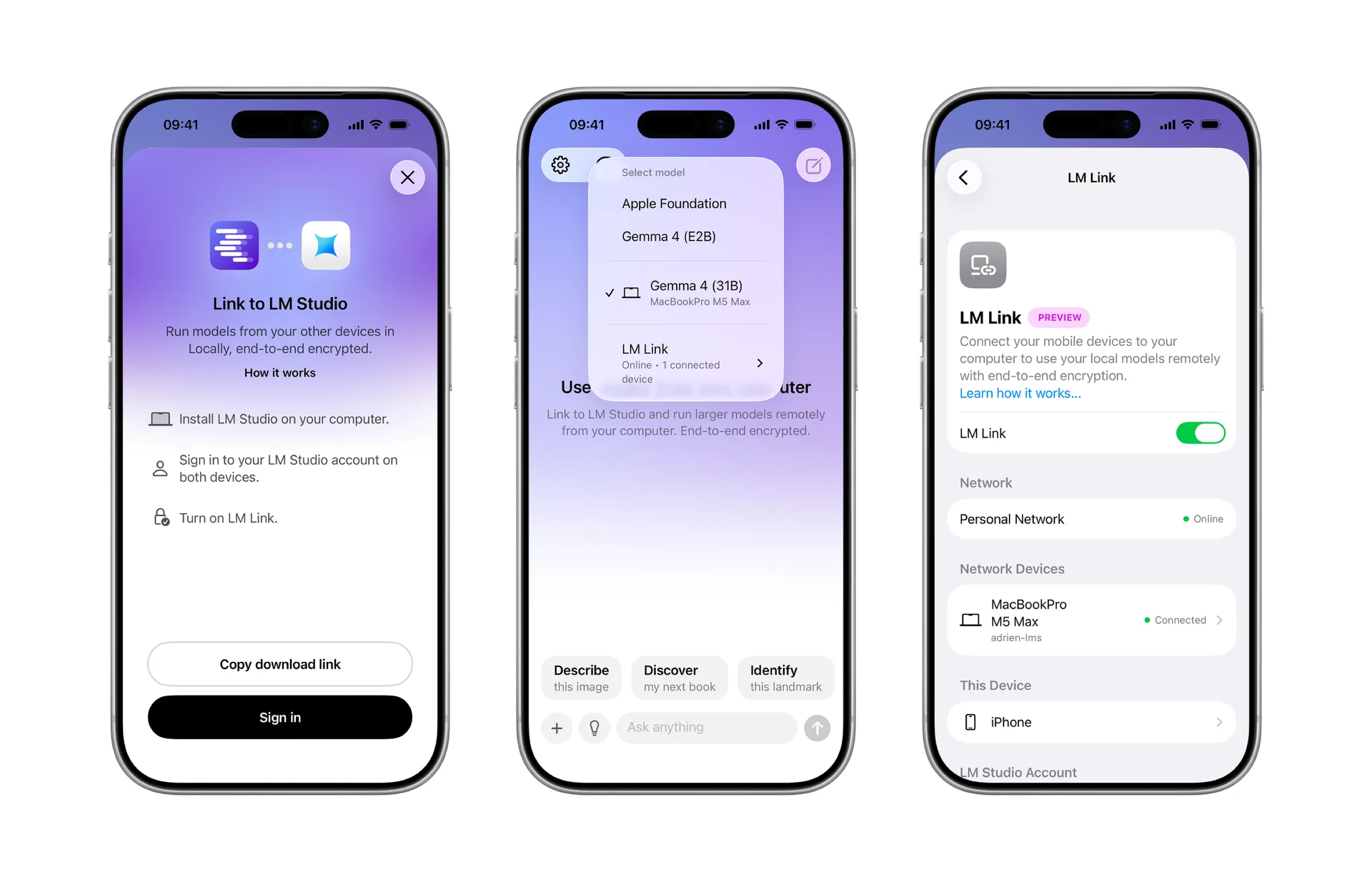
With LM Link, a model running on another computer can also be accessed from a laptop. Ollama similarly allows models to run in the background and connect to other applications through APIs. Locally running models can also be connected to coding tools and other AI applications. An “AI server” does not necessarily have to mean a massive rack in a data center.
This is where characteristics that once pushed desktops aside can become advantages. They do not need to be small or lightweight like laptops, and battery life is irrelevant. Many desktops allow graphics cards to be replaced or added, while cooling and storage are relatively easy to expand. Above all, they are well suited to sitting in one place and staying powered on for long periods.
The criteria for evaluating hardware also begin to change. In the past, the question might have been how well an older gaming PC could run the latest games. For local AI, the amount of VRAM on the graphics card also becomes an important factor. Larger models require more memory, so even an older GPU may find a new use if it has enough VRAM.
The architecture is somewhat different on a Mac. Apple Silicon uses a unified memory pool shared by the CPU and GPU, allowing machines with larger memory configurations to make substantial amounts of memory available to AI models. On a typical Windows desktop, by contrast, system RAM and graphics-card VRAM are separate, making the amount of memory available on the GPU a more direct constraint.
Of course, not every old PC can be repurposed as an AI server. But if a computer has fallen out of regular use after being replaced by a newer machine while still retaining enough GPU performance and memory to run AI models, the situation changes.
Repurposing such PCs is not new in itself. Spare computers have long been turned into NAS systems, home servers, and media servers for storing files, streaming video, or hosting game servers. Local AI adds another role to that list. The same machine can now serve as an AI server that analyzes documents, reviews code, answers questions, or handles requests from other applications.
What is interesting is that even as people spend less time directly using desktop computers, there is now one more way to put the computing power inside them to work.
Does the Subscription Bill Become an Electricity Bill?
Cost is another reason local AI is attracting attention. Cloud AI provides immediate access to powerful models without requiring dedicated hardware, but costs rise as API usage increases. This can add up quickly with AI agents, which may call a model repeatedly to complete a single task or repeatedly process long contexts.
Local AI has a different cost structure. Buying a new PC specifically for the purpose can require a substantial upfront investment, and running models consumes electricity. But if the hardware is already available, sending one more prompt to a local model does not incur another per-token charge. Some of the usage-based cost of the cloud is effectively shifted to hardware and electricity.
Apple has also emphasized this point when presenting new Macs as local AI machines, highlighting the ability to run models without worrying about cloud AI token costs. But that does not mean local AI is always cheaper. If a model is used only occasionally, paying for cloud access when needed may make more economic sense than buying an expensive GPU.
A clearer difference than cost is where the data is processed. For company code, internal documents, personal files, or other information that users may hesitate to send to an external AI service, both the model and the data can remain on the user’s own PC. Local models can also work without an internet connection, and smaller models dedicated to specific tasks can be kept running continuously.
That does not mean local AI will push the cloud aside. Larger and more powerful models can still be used from the cloud when needed. So while the idea that “subscription fees become electricity bills” is catchy, it does not capture the whole shift. More important is that personal computers are beginning to take on some of the AI computation that had largely been considered the domain of data centers.
The Role of the Personal Computer Comes Full Circle
On early personal computers, programs and data—and most of the computation itself—resided on the local machine. As the internet and the web developed, some data and software moved to servers. In the cloud era, it became normal to borrow computing power that would have been impractical for individuals to own themselves.
Generative AI initially appeared to reinforce this trend. Huge models were difficult for individuals to run themselves, so calling AI in a data center from a smartphone or lightweight laptop became the natural approach. At times, which AI service a computer could access seemed more important than what kind of computer it actually was.
But as models have diversified and quantization techniques and local AI software have improved, not every AI workload requires a massive data center. Smaller models and models designed for specific purposes can run on personal computers, and it is becoming easier to leave one PC running while several other devices share its computing power.
As a result, the performance of the personal computer is beginning to matter in a different way again. With local AI, physical hardware characteristics such as GPU performance, memory capacity, and memory bandwidth help determine which models a machine can run. In the future, alongside questions such as “How well does it run games?” or “How fast is it at video editing?”, another consideration when buying a computer may be: “Which AI models can it run locally?”
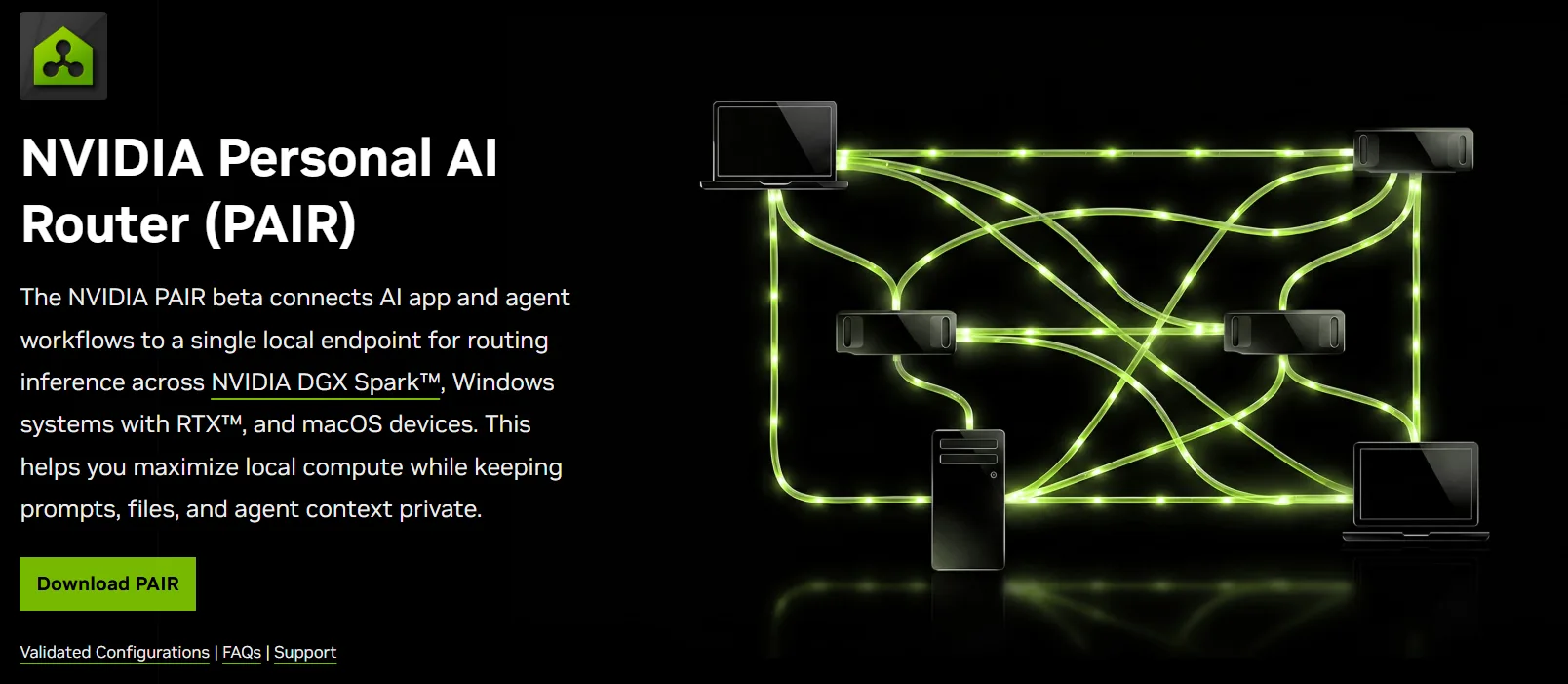
For a time, the personal computer increasingly served less as a machine that performed computation itself and more as a gateway to cloud services and computing resources. Local AI is introducing a small shift in the other direction. Instead of sending every computation to the cloud, AI workloads that a PC can handle are beginning to run locally again. That does not mean the cloud is going away. Huge models will continue to run in data centers, while personal computers can once again handle AI workloads suited to their own capabilities.
Coming full circle, in the age of AI, the personal computer is once again gaining attention as a machine that computes for itself.